
What Matters When Choosing Digital Booths
Choosing a Digital Booth? Check self-service support, print-free content, Wi-Fi, branding, data capture and venue space before booking MooMuu.
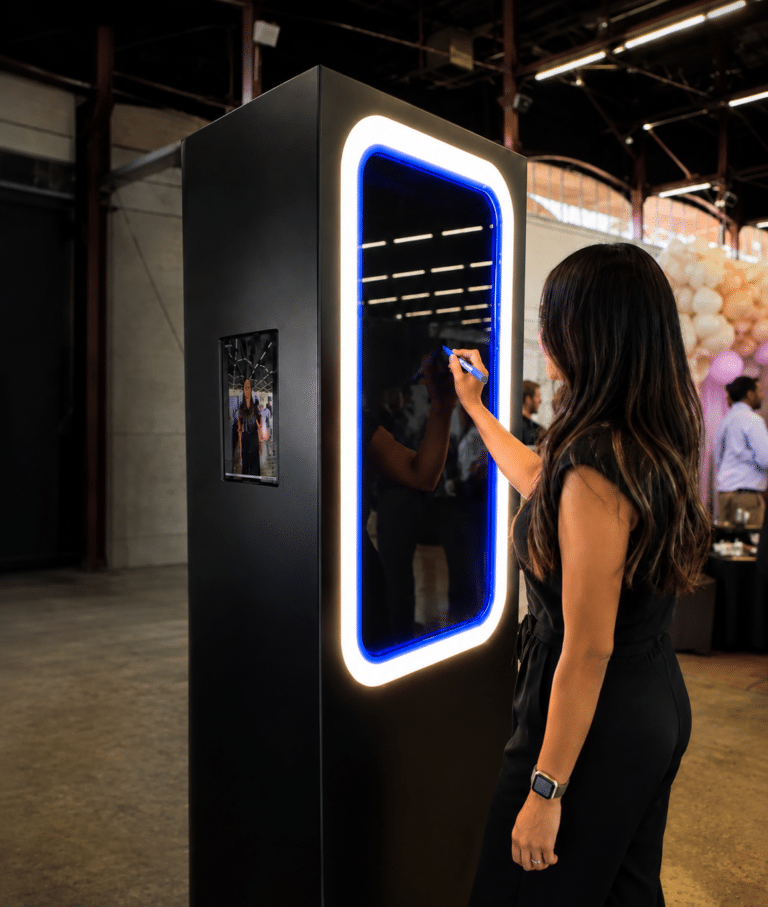
MooMuu’s Digital Booth is a self-service, print-free experience for photographs, GIFs, boomerangs and short videos. It suits an event where guests are happy to follow on-screen instructions and receive digital content rather than a physical print.
The important questions are practical: what will guests create, how will they receive it, what support is included and will the venue connection work? A digital-sharing feature alone does not tell you which booth or service model you are booking.

Understand the experience you are choosing
The Digital Booth has a compact setup and no printing station. MooMuu delivers, installs and tests it before the agreed start, then returns to collect it. Remote support is available during the operating period; an attendant does not normally stay on site.
If guests need in-person guidance or you want printed keepsakes, ask about an attended photo experience instead. MooMuu’s hosted booths can also offer digital sharing, so the choice is not simply between photographs on paper and photographs on a phone.
Check photographs as well as features
Ask to see content from the Digital Booth itself, preferably from events with comparable lighting and surroundings. A still photo, GIF and short video serve different purposes. Choose the formats you want before planning the artwork or guest invitation.
Look at the framing, group photographs and how the background appears in the finished result. Do not assume that every screen-based booth uses the same camera, lighting or image treatment, or that a colour photo experience includes Signature GLAM processing.
Confirm the connection before promising instant sharing
Guests receive content through the agreed QR code, SMS or email options. Reliable internet is needed for immediate sharing. Tell MooMuu about the venue’s Wi-Fi and mobile signal, including any known limitations at the proposed booth position.
If the connection is weak, discuss a suitable delivery approach before booking. Do not assume instant receipt everywhere or promise that a particular offline arrangement is included. Agree how to get help during the operating period if guests have difficulty receiving their content.
Allow room around the compact unit
Leave space to pose, use the screen and move away without blocking a bar, doorway or registration desk. Share access arrangements and the location of a suitable power socket with MooMuu. Compact equipment still needs a workable guest area.
The Digital Booth is primarily for indoor use. Any proposed outdoor installation needs approval in advance and suitable covered, dry conditions, a solid level floor and access to power. Confirm the practical plan with MooMuu and your venue.
Separate styling from standard inclusions
MooMuu does not supply props. A large freestanding backdrop is not included as standard with the Digital Booth. Discuss the available background options or any client-supplied styling before assuming an example photograph represents everything in your package.
The welcome screen and digital artwork can be personalised. Keep names, dates, logos and wording legible without covering the photograph. For corporate events, explore brand activation photo ideas, then agree the artwork and approval process for your chosen setup.

Plan data capture as a separate part of the brief
MooMuu can provide data capture. Confirm the questions, guest choices and delivery requirements in advance. Details entered to receive a photograph are not automatically permission for marketing.
Keep the activity aligned with your aim: digital content, conversations or requested follow-up may require different plans. When comparing interactive brand activations, distinguish participation from qualified leads and downloads from public social shares.
AI-led experiences use a different creative workflow. Ask about them separately if you want transformed portraits; AI artwork should not be assumed to be part of a standard Digital Booth booking.
Make the booking and handover clear
Confirm operating hours, setup and collection access, personalised artwork, support and the complete price. Discuss extra time or venue requirements before accepting the proposal. The date is secured only when the booking requirements and payment terms shown in your proposal have been completed.
Agree how you will receive the post-event gallery and download the files before its stated expiry. If a printed guestbook is essential, choose a compatible printed-booth package with the book, extra photograph and attendant assistance; Digital Booth does not print photos for an album on the night.
Plan your Digital Booth experience
See the Digital Booth details and live availability, or ask us about Digital Booth hire. Share your date, venue and guest numbers, and let us know about Wi-Fi or mobile signal at the venue. Checking availability does not reserve your date.