
What Guests Do at Brand Activations
See what guests do at MooMuu brand activations, from joining in and creating photos or artwork to collecting their keepsakes and choosing what happens next.
What guests do at brand activations depends on the format: they might pose for a photograph, watch a portrait being drawn, create digital artwork or contribute to a shared image. A well-planned journey makes the activity, expected wait and takeaway clear before someone joins in.
Not everyone will follow the same path. Some guests want to participate with friends; others prefer to watch or move on. Use the following journey as a planning guide for a MooMuu event, not a prediction of how every visitor will behave.
1. Notice the experience and understand the invitation
Show one clear action: take a portrait, create an artwork or add a photo to the mosaic. Place the invitation where people can read it without blocking the queue. A sample output can help explain what they will receive.
At a hosted ICON Booth, the attendant can welcome guests and explain the photo session. With the normally self-service Digital Booth, plan clear on-screen instructions and any directional help from your event team; an on-site attendant is not normally included.
2. Decide whether and how to take part
Before joining a queue, a guest should understand the activity, likely wait and whether a photo or contact details are involved. Keep participation optional. Do not make an invitation to create a keepsake feel like an obligation to post publicly or join a mailing list.
Discuss access and support needs with MooMuu in advance. Confirm the comfortable group size and approach space for the chosen setup. Leave room for spectators without forcing them into photographs or obstructing other guests.
3. Make the photo or artwork
The action varies across the range. These are alternatives to choose between, not a series that every guest completes.
- Photo booths: guests pose for a photograph or use the available motion formats. Signature GLAM provides a monochrome photographic look; other booth formats have their own design and output options.
- AI Sketch Bots: a guest photograph becomes an illustration which the robots physically draw on paper. Drawing and collection are part of the visit, so allow for the chosen style and demand.
- AI Experience: a photograph becomes a themed creative interpretation. Set expectations using approved samples rather than promising an identical result for everyone.
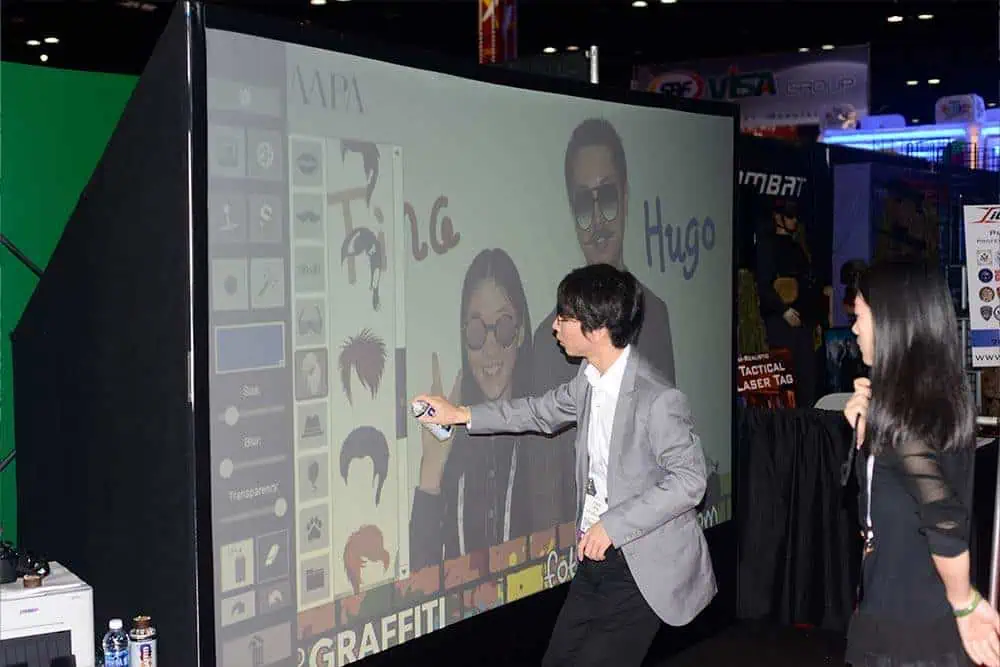
- AI Graffiti Wall: guests use digital spray cans and on-screen tools to draw or work over an image. Optional AI transformation is a separate stage of the agreed activity.
4. See a contribution join something larger
Photo Mosaic Wall turns guest phone uploads into a shared physical artwork. Guests scan the event QR code or use the dedicated upload webpage to submit a photo, then add its printed, coded tile to the wall. MooMuu’s team guides participation and manages the mosaic build.
With the separate Digital Mosaic, guests take or upload a photograph through a QR code or link. Contributions build an image on screen and can include remote participants. Agree the upload window, display and any moderation, and explain that contributions may need review before appearing.
Neither format needs to be added to every photo brief. If you want a combined experience or several locations, confirm availability, staffing and the delivery plan first.
5. Collect or access the output
Tell people where to collect a drawing or print, or how to receive their digital result. Keep the collection point separate from the next person’s session where the layout allows. Check the journey on an ordinary guest phone before opening.
Prints, file delivery and internet requirements vary by experience. The Digital Booth is print-free; optional prints for an AI format should not be assumed. Agree gallery access and any expiry or download deadline, and make the instructions easy to find.

6. Choose what happens next
A guest might save the photograph, show a colleague, take a keepsake home or ask your team about the campaign. None of those actions guarantees a social post, recommendation or sale.
Keep any sales conversation welcoming and optional. Explain image use and any request for contact information. Receiving an image is not automatically a marketing opt-in; resolve the intended follow-up through the data-capture planning process.
Test the journey before guests arrive
Walk through it from the entrance: can someone see the invitation, find the queue, understand the output and leave without crossing the next session? Check instructions, lighting, power, connectivity and collection with the venue and MooMuu team.
Agree an operating window that fits the programme. Where you measure participation, distinguish completed sessions from individual people and avoid treating queue length as proof of engagement. For the wider production checklist, see how to run a branded photo-booth activation.
Plan a guest journey that fits your event
Tell us who is attending, the date and venue, and what you would like guests to create. We can help select a suitable experience and clarify the practical steps.
Request a tailored corporate proposal or compare corporate experiences. For a wedding or private celebration, tell us about your event.